Healthcare Data Migration: How to Move Without Losing Records
Every hospital eventually replaces a core clinical system. Contracts end, organisations merge, platforms reach end of life, or a move to the cloud becomes the strategy. The new system is usually the exciting part. The data migration is where projects quietly fail: a prior study that cannot be found during a cancer follow-up, an allergy that did not come across, a report attached to the wrong patient.
This guide sets out a vendor-neutral approach to moving electronic medical record (EMR) and imaging data between systems without losing records, or the trust of the clinicians who rely on them.
Start with scope, not software
Migration planning should begin before the new contract is signed. Guidance from the US Office of the National Coordinator for Health IT stresses that careful planning is what allows a new system to integrate and access historical data, and its guide on switching systems recommends negotiating transition support, data export and conversion assistance, and continued access to the legacy software as part of the contract. Outgoing vendors rarely offer these terms by default, and a proprietary export format can make conversion slow and expensive.
Agree early on three decisions:
- What moves. Full history, a defined look-back period, or only active patients, with the rest kept in an accessible archive.
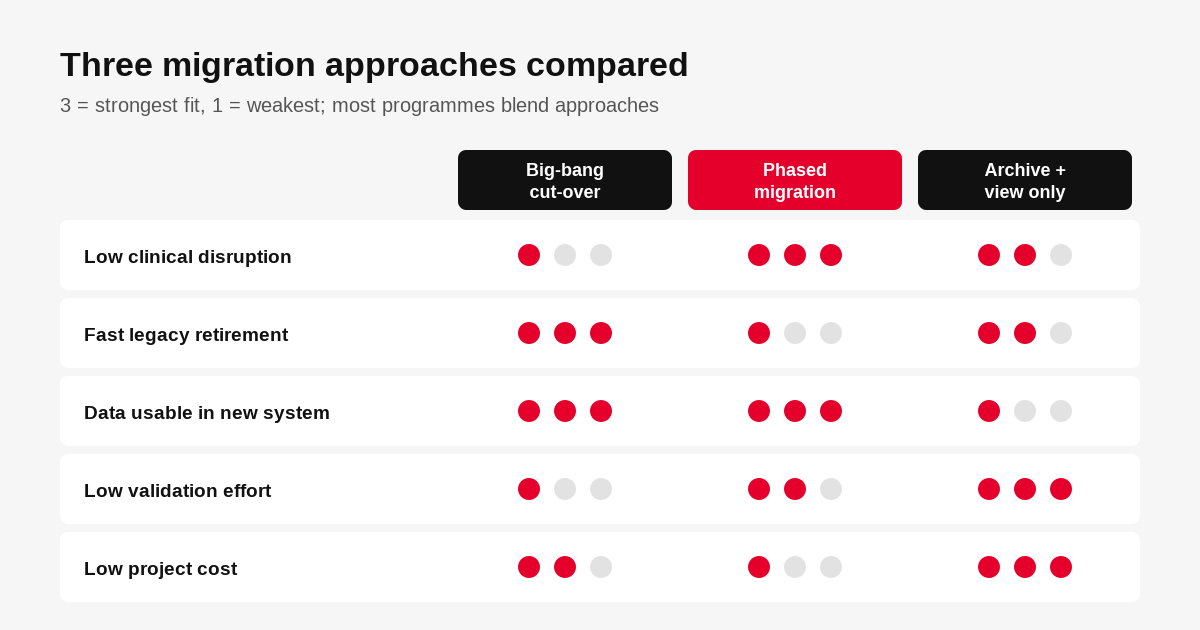
- How it moves. A single big-bang cut-over, a phased migration, or an archive with view-only access.
- Who signs off. Named clinical, IT, information governance and departmental owners for each data domain.
Map the data before you move it
Data mapping is where clinical meaning is either preserved or lost. Build a mapping specification for every domain: demographics, encounters, problems, allergies, medications, results, documents, orders, reports and images.
For structured EMR data, the hard part is codes. Local lab codes, medication lists and free-text allergies rarely line up neatly with the target system, and a poorly mapped allergy can stop decision support from firing. Decide which items must arrive as structured data and which can come across as documents.
For imaging, the format is usually DICOM, but the detail still matters. The IHE radiology community has highlighted recurring migration issues: limits on which transfer syntaxes the target accepts, competing report formats, how to carry annotations and key images, and how to handle demographic corrections made after the images were acquired. Agree how patient identifiers, accession numbers and unique study identifiers will be preserved, and how compressed, private or non-standard objects will be treated.
Reconcile patients and studies
Most lost records are not deleted. They are orphaned: present in the new system but attached to the wrong patient, under an outdated identifier, or missing the order that links them to a report.
- Run a master patient index clean-up before migration, merging duplicates and correcting identifiers in the source wherever possible.
- Reconcile imaging studies against RIS orders and reports so each study has a patient, an accession number and a report status.
- Keep a cross-reference of old and new identifiers, and keep it permanently.
- Route exceptions such as unmatched studies, conflicting demographics and failed objects to a named work queue rather than a spreadsheet nobody owns.
- Agree how merges and corrections made in the source during the migration window will be carried across.
Validate, then validate again
Validation should be planned as carefully as extraction. A practical layered approach:
- Counts. Patients, encounters, documents, studies, series and images in source versus target, per batch and in total.
- Integrity. Checksums or object-level verification for images, so you know each instance arrived intact.
- Sampling. Clinician review of a statistically meaningful sample of charts and studies, including complex patients, paediatrics and long-term oncology cases.
- Function. Confirm that migrated data behaves correctly: priors appear for comparison, results trend, allergies trigger alerts and documents open.
Record every exception and its resolution. That log becomes your evidence if a record is ever questioned.
Cut-over, archiving and retention
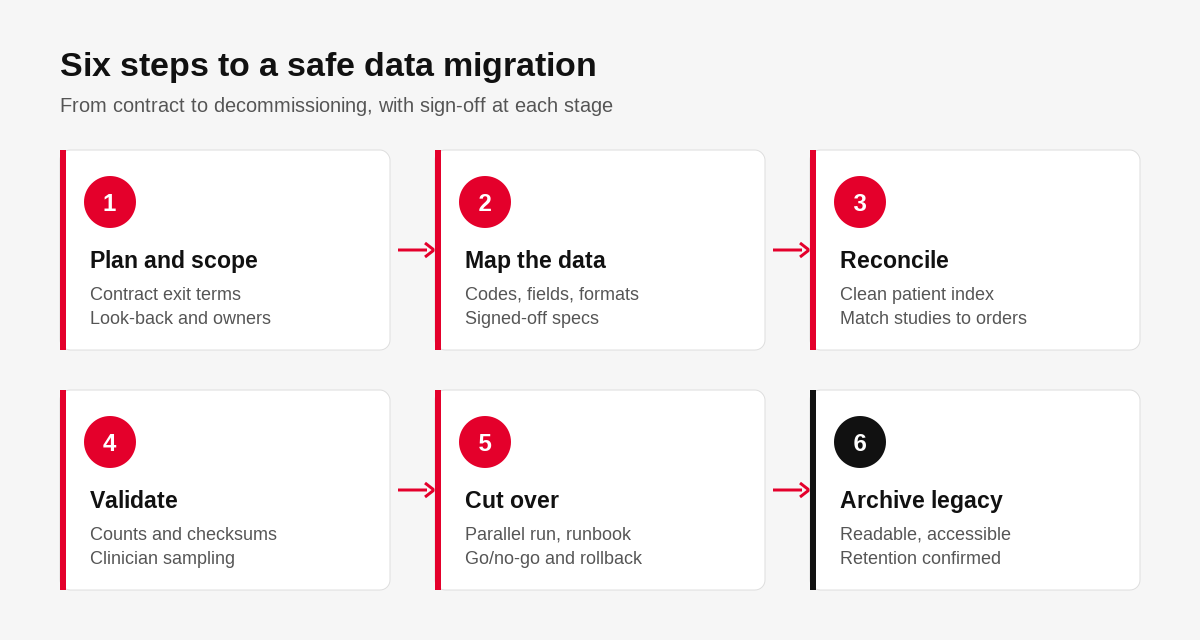
Large imaging archives often take weeks or months to move, so most organisations migrate history in the background while new data flows to the target system. During that period, routing rules must be clear: where new studies are sent, where prior studies are fetched from, and how results reach the right record.
A short period of parallel running, with both systems available and the old one becoming read-only, reduces risk. Prepare a cut-over runbook with go and no-go criteria, a delta migration for anything created at the last minute, a downtime plan and a rollback point. Plan extra support on the floor for the first weeks; clinical productivity typically dips while staff adjust.
Switching off the old system is not the same as disposing of its data. Records must remain accessible for future clinical care, subject access requests and legal claims for as long as your retention obligations require, and these differ by country, record type and patient group, such as minors. The Royal College of Radiologists notes that "all records must remain accessible for future clinical care", meaning their existence is visible, they can be retrieved within a clinically useful time and future systems can read them.
Options include keeping a read-only instance, moving remaining data to a vendor-neutral clinical archive, or exporting to a documented, standards-based format. Whichever you choose, confirm local retention rules with your information governance and legal teams, keep an archival copy of the software and documentation where needed, and only decommission once sign-off is recorded. If data moves to a cloud region in another country, check data protection rules on cross-border transfers first.
Data migration checklist
- Negotiate transition support, data export and legacy access in contracts.
- Define scope, look-back period and migration approach with clinical owners.
- Write and sign off mapping specifications for every data domain.
- Clean the master patient index and keep an old-to-new identifier cross-reference.
- Reconcile studies with orders and reports, and staff an exception work queue.
- Validate counts, integrity, clinical samples and function for every batch.
- Run a rehearsed cut-over with go and no-go criteria and a rollback plan.
- Archive legacy data in a readable form and confirm retention before decommissioning.
Conclusion
A successful migration is invisible to clinicians: the right history is there when they need it. Getting there takes early contract planning, careful mapping, disciplined reconciliation and evidence-based validation, not just a fast transfer tool. Treat the legacy archive and the retention plan as part of the project, not an afterthought.
Planning a healthcare data migration project? Talk to our team at info@teczodus.com.
Sources
- ONC Health IT Playbook: Electronic health records – migrate your data
- ONC: EHR contract guide – Transition issues, switching EHRs
- IHE: Radiology Data Migration – brief proposal
- IHE: Patient Information Reconciliation
- Royal College of Radiologists: Application of the Records Management Code of Practice to radiology record retention protocols
- American Medical Association: 10 challenges when switching EHRs, and how to meet them
Talk to an expert
More insights
- India's ABDM Explained for Hospitals and Imaging Centres
ABHA, HPR, HFR, consent-based exchange, FHIR and incentives: what India's Ayushman Bharat Digital Mission means for hospitals, labs and imaging centres. - Going Digital in Pathology: What Labs Need First
Before buying scanners or AI, labs need the right foundations: storage, network, LIS integration, DICOM and validation. Here is what comes first. - Teleradiology in the Gulf: Operating Models and What to Check
Hub-and-spoke, outsourced, hybrid or cross-border? How Gulf providers can choose a teleradiology model and handle licensing, data residency, technology and SLAs.